I still remember this one day, my old laptop took a solid eleven minutes just to boot up. Eleven. I actually timed it, that’s how annoyed I was, sitting there watching this dumb little spinning circle while my coffee just sat there going cold.
That thing had a regular old hard drive in it, and honestly, I didn’t even know there was another option until a friend randomly went, “bro, just swap in an SSD.” And not gonna lie, my first reaction was pure skepticism. Sounded like exactly the kind of thing some tech bro throws out just to sound smart, honestly.
But I did it anyway. And the difference genuinely floored me. Same laptop. Same everything else, specs and all. Booted up in under 15 seconds flat. That one upgrade changed how I think about computers entirely.
If you’re trying to figure out whether to go with an SSD or an HDD for your next laptop, or maybe just an upgrade for the one you already have, I’ve been through this decision more times than I can count. For myself, for family, for coworkers who randomly hit me up like “hey, you’re good with computers, what should I get?” So let’s just break it down properly.
What Even Are SSDs and HDDs, Anyway?
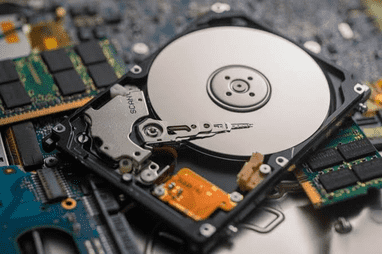
Okay so let’s start super basic here, because honestly, so many people just buy laptops without having a single clue what’s actually sitting inside them.
An HDD, or Hard Disk Drive is basically just the old-school, outdated way of storing your stuff. It’s got these spinning magnetic disks inside (they’re called platters) plus a tiny mechanical arm that reads and writes data by physically moving across the disk. Kind of like a mini record player sitting inside your laptop, if you think about it.
An SSD, or Solid State Drive on the other hand, has zero moving parts. None. It stores everything on flash memory chips instead, basically like a much bigger, much faster USB drive. Nothing spinning, nothing physically moving around to go grab your files.
And that one difference, moving parts vs. no moving parts is really the root of pretty much every advantage SSDs have over HDDs. It’s why they’re faster, more durable, quieter, run cooler and even help with battery life. Once that clicks, honestly, the rest of this comparison makes a lot more sense.
Speed: The Difference You’ll Actually Feel
This is honestly the part that matters most to regular people, so let’s not bury it in tech jargon.
From what I’ve seen testing both drive types across a bunch of laptops over the years, SSDs just completely wreck HDDs on speed. It’s not even close not even a bit.
Here’s what you’ll notice, day to day:
- Boot times: HDD laptops take 30 seconds sometimes over a minute just to boot. SSDs do it in 10-20 seconds.
- Opening apps: Photoshop or a big Excel file opens almost instantly on an SSD. On an HDD you’re stuck staring at a loading bar.
- Moving files: A folder of photos or videos copies way faster on an SSD.
- Multitasking: Fifteen tabs, Spotify, a Word doc, all open? SSDs just handle it better.
Numbers-wise, a regular HDD does about 80-160 MB/s. A SATA SSD’s more like 500-550 MB/s, and NVMe SSDs, the newer kind, can go anywhere from 1,500 MB/s all the way up to 5,000+ MB/s depending on the model. So yeah, it’s not some small upgrade. It’s different universe.
I helped my uncle put an SSD in his old 2015 laptop instead of buying new one and he called me right after, totally confused, asking if I’d secretly swapped it out for a new laptop. Nope. Same laptop. Just way faster storage.
Durability and Reliability
Since SSDs don’t have any moving parts, they’re just naturally more durable, especially when we’re talking laptops specifically.
Think about it, laptops get carried around everywhere. Dropped. Bumped inside bags. Shoved into backpacks without a second thought. An HDD, with its spinning platters and that delicate little read/write arm inside, is just way more vulnerable to that kind of physical movement and shock. I’ve actually seen a hard drive die after a laptop took a tumble off a couch, of all things. Not even a dramatic fall or anything, just an awkward little slide off a cushion.
SSDs, though, can usually handle a lot more bumping and jostling around without any issue, mainly because there’s nothing mechanical inside that can get knocked out of place.
That said, SSDs aren’t invincible either, let’s be honest. They do have a limited number of write cycles before the memory cells start wearing down but for normal everyday use that’s not something most people are gonna run into for years, maybe even a decade or longer. Modern SSDs can handle a huge amount of data before wear even becomes something worth actually worrying about.
Quick reliability comparison:
- HDDs: More prone to mechanical failure from drops or shocks
- HDDs: Performance can degrade over time as parts wear down
- SSDs: More resistant to physical damage
- SSDs: Have write endurance limits but rarely an issue for average users
Price and Storage Capacity
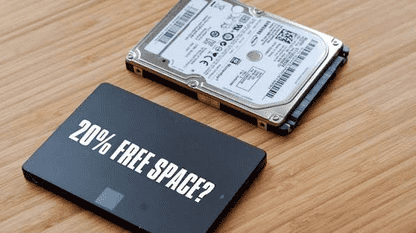
Okay, here’s where HDDs still hold some ground — mainly on price per gigabyte.
If you need a ton of raw storage space on a tight budget, like 2TB or more just to dump files, HDDs are generally cheaper per gigabyte than SSDs. This is why a lot of external backup drives and desktop storage solutions still use HDD technology.
Now, SSD prices have actually dropped a ton over the past several years. What used to be this huge price gap is way more reasonable these days, especially if you’re looking at stuff like 256GB, 512GB, or 1TB, which honestly covers most regular people just fine.
Here’s roughly what I’d tell a friend, if they asked me while out shopping for a laptop:
- Honestly, if you’re mostly just browsing, writing up docs, streaming stuff, maybe a few basic apps here and there, a 256GB or 512GB SSD is more than enough for what you need.
- If you’re into content creation, gaming or dealing with big files, like video editing or design work, try to stretch to 1TB if your budget lets you.
- And if you genuinely need a ton of storage, like 4TB or more, purely just for archiving stuff, and speed isn’t really the priority, an HDD can still make sense. Maybe even just as secondary or external storage.
Honestly though, for a primary laptop drive in 2026, I’d rarely recommend going pure HDD anymore unless the budget is extremely tight.
Battery Life and Heat
This one surprises people. SSDs generally use less power than HDDs because there’s no motor spinning a disk or an arm physically moving back and forth.
Less power draw means:
- Slightly better battery life on laptops with SSDs
- Less heat generated during heavy storage use
- Less strain on the laptop’s cooling system overall
It’s not some massive, life changing difference all by itself but combined with everything else, it honestly adds up. I actually noticed my laptop ran noticeably cooler under my palm after I switched over to an SSD, especially during file-heavy stuff, like backing up a ton of photos.
Noise Levels (Yes, This Actually Matters)
Honestly, I never thought “noise” would end up getting its own section in a storage comparison, but here we are, because it genuinely caught me off guard the first time I used an SSD laptop.
HDDs make noise. Not obnoxiously loud or anything, just this subtle whirring, and sometimes a bit of clicking, as the read/write arm moves around in there — especially when you’re doing something storage-heavy, like installing software or moving a bunch of big files.
SSDs, though? Completely silent. No moving parts, no sound. Period, full stop.
And if you’ve worked in a quiet room or late at night while everyone else’s asleep. This difference genuinely hits harder than you’d think. I honestly didn’t even realize how much low-level noise my old HDD was making the whole time until I upgraded and just… one day, stopped hearing it altogether. Kinda eerie, actually, at first.
Which One Should You Choose?
Let’s get practical. Here’s my honest, no nonsense take based on different use cases:
Choose an SSD if:
- You just want your laptop to feel fast and responsive without you having to think about it.
- You’re using it for work or school or honestly just everyday, regular stuff.
- You value quick boot times and app launches
- You’re okay with slightly less storage for significantly more speed
- Battery life and operation matter to you
Go with an HDD (or an SSD + HDD combo) if:
- You need massive storage space on a very tight budget
- You’re archiving large amounts of data that you don’t access frequently
- Speed isn’t a priority for that specific use case
My honest opinion? For a primary laptop drive, SSD wins pretty much every time. Honestly, the performance gap between SSD and HDD for laptop use is so big that it genuinely changes how the whole machine feels to use. Even a budget laptop with a smaller SSD tends to feel snappier and just more pleasant to use than one with a bigger but way slower, HDD.
And actually, some laptops give you both — a smaller SSD for your operating system and the apps you use all the time, plus a bigger HDD sitting alongside it for bulk storage, like your photos and videos. This setup basically gives you speed where it actually matters, and cheap storage where you need the extra room.
Common Mistakes People Make
After helping quite a few people through this decision over the years, I’ve noticed some mistakes that keep popping up, worth flagging honestly:
- Buying based on storage size alone.A 1TB HDD laptop might look better on paper than a 256GB SSD one, but honestly, the SSD’s gonna feel faster and just nicer to actually use, day in and day out.
- Not checking whether it’s a SATA SSD or an NVMe SSD. Both count as SSDs, technically, but NVMe’s a good bit faster. If speed’s your priority, actually check the specs before you buy, don’t just assume.
- Assuming all HDD laptops are “bad.” They’re not bad, honestly, just slower. For light, occasional use, or as secondary storage, they can still be a totally reasonable, budget-friendly pick.
- Forgetting to back up your data before upgrading. If you’re swapping an HDD for an SSD yourself, always, always back up your data first. Learned that one the hard way, after a rushed upgrade that didn’t go great.
- Overpaying for storage you don’t even need. Most people honestly don’t use anywhere close to 1TB. Be real with yourself about your actual usage before splurging on something you won’t use.
Where Laptop Storage Is Headed
Looking at where things are going, HDDs are increasingly getting pushed toward bulk external storage and enterprise stuff, while SSDs just keep becoming the default for laptops across pretty much every price range now. NVMe SSDs especially just keep getting faster and cheaper every year, and honestly, it’s pretty rare now to even find a mid-range or premium laptop that still ships with a regular HDD as the main drive.
If you’re out buying a new laptop today, odds are it’s already coming with an SSD built in by default, and that’s only gonna keep going from here.
Final Thoughts
At the end of the day, honestly, this whole decision just comes down to what you value most: raw storage space for less money, or speed, responsiveness, and reliability. Based on everything I’ve personally gone through and tested myself, I’d pick an SSD every time, no hesitation at all, and I really think most people would feel the same way once they actually experience it.
If you’re still on the fence about it, just think back to my uncle — how his “old” laptop suddenly felt brand new out of nowhere. That’s honestly the kind of difference we’re talking about here.
And whatever you end up going with, I hope this at least made the decision a little bit easier for you.
FAQ’s
Is an SSD really that much better than an HDD for a laptop?
Yeah, honestly it is, for most everyday use anyway. Boots faster, apps open quicker, stuff just feels smoother. The one thing HDDs still win at is cheaper storage per gig, and that only really matters if you need a lot of space and money’s tight.
Can I upgrade my old HDD laptop to an SSD myself?
Most of the time, yeah, especially on older laptops where you can actually open it up. Check your laptop’s specs, make sure it can actually take an SSD. Back up your files, don’t skip this part. Then either clone your old drive across, or wipe everything and start clean, whichever you prefer.
Does an SSD actually improve battery life?
A bit, yeah. Not huge, but you’d notice. No motor or arm moving inside means less power used. So a little extra battery, and less heat too.
How much SSD storage do I actually need?
Honestly, for most people, just browsing around, writing stuff, streaming shows — 256GB or 512GB is more than plenty. Big files, video editing, lots of games? Go for 1TB or more. Just be honest about how you actually use your laptop.
Are HDDs becoming obsolete for laptops?
Pretty much, yeah, as the main drive anyway. SSDs keep getting cheaper so HDDs are getting pushed out. Still around for external storage or really cheap laptops, but most new ones now just come with an SSD.